
Weak prompt
Make an audio story.
Vague. No scene. No characters. No mood.
Prompt lab
A great prompt is not a sentence — it is a creative brief for sound. The more clearly you describe the scene, voices, dialogue, music, sound effects and emotion, the easier it is to generate audio that feels polished, cinematic and ready to use. This guide shows you the exact structure, formulas and prompt examples that consistently produce broadcast-ready output from Seed Audio 1.0.
9 elements
Full prompt structure
6 examples
Copy-ready templates
@Audio refs
Multi-voice scenes
1 formula
Start anywhere
Generated from the full prompt below — one pass, no post-production.
Radio Drama Opening — Lighthouse Scene
Generated with Seed Audio 1.0 · ~20s
Prompt used
Create a cinematic radio drama scene opening. Setting: a stormy night inside an old coastal lighthouse. Heavy rain hits the windows, distant thunder rolls over the ocean, and the lighthouse lamp rotates with a low mechanical hum. Music: subtle cinematic score with deep strings, soft piano, low ambient drones. Mood: mysterious, emotional, suspenseful. Narrator: clear audiobook narration, calm but tense: "On the night the lighthouse went dark, Clara found the letter her father had hidden for twenty years." End with rising strings and a single foghorn.
Most audio AI tools treat your prompt as a single line of text that needs to be voiced. Seed Audio 1.0 is different — it reads your prompt the way a film director reads a treatment. That means your prompt should describe a scene, not just a sentence.
A strong Seed Audio 1.0 prompt has nine layered elements that work together to give the model creative direction without overloading it: audio type, setting, mood, music, sound effects, characters, dialogue, pacing and ending. Master these nine elements and you can move from "AI voice generator" output to genuinely broadcast-grade productions.
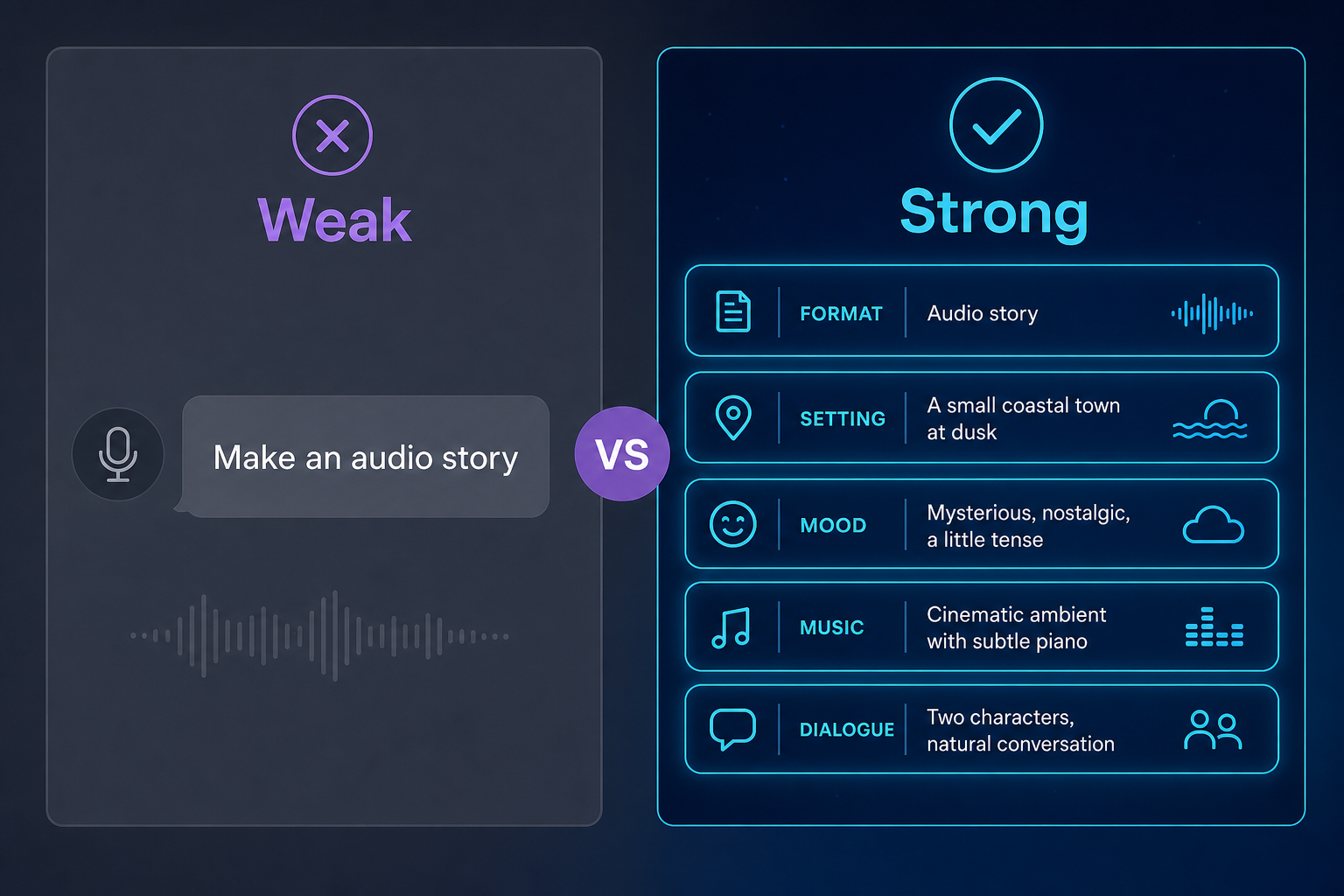
Make an audio story.
Vague. No scene. No characters. No mood.
Create a cinematic radio drama scene for a serialized audiobook.
Setting: a stormy night inside an old coastal lighthouse.
Music: deep strings, soft piano, low ambient drones.
Narrator, calm but tense: "On the night the lighthouse went dark,
Clara found the letter her father had hidden for twenty years."
End with rising strings and a foghorn.
Specific scene. Layered direction. Cinematic outcome.
New to Seed Audio 1.0? Start with the basics first →
Writing effective prompts is key to unlocking the creative power of Seed Audio 1.0. A prompt can include the following elements:
Text content: The specific lines to be synthesized.
Reference material citation: Use the @ symbol to reference uploaded reference audio or a voice from the Voice Library. For example: @Audio 1 or @Audio 2.
Character and scene descriptions: You can naturally weave character settings and scene atmosphere into the text, and the model will understand and generate the corresponding audio. For example, describe a cast of characters and a music score, and then orchestrate the dialogue.
Example
Above raging sea, continuous howling gale-force wind and the crashing roar of towering waves smashing down, a thunderous eruption of water and a deep booming roar. Varmak (adult male, rough booming voice, commanding, battle-hardened, epic sci-fi style) shouts with challenging authority, "Cast the nets! we take the Kraken alive!" Paul (young adult male, tense strained breath, low determined voice, epic sci-fi style) murmurs inwardly, "I must not fear. The sea has taught me." Pounding surging swim strokes, then a sharp metallic hook clamping into the scales and the groan of straining ropes drawing taut; a huge water-churning bellow of pain with heavy roiling currents that slowly weakens into exhausted, defeated snorts. Paul shouts with sudden commanding force, "We've got it — it's caught!" Varmak laughs loudly with pride, "Look what we've landed! The Kraken is ours! From this day on, he is one of us!"
Demo Name
Monster Hunt
Prompt
Above a raging sea, continuous howling gale-force wind and the crashing roar of towering waves smashing down; a thunderous eruption of water and a deep booming roar. Varmak (adult male, rough booming voice, commanding, battle-hardened, epic sci-fi style) shouts with challenging authority, "Cast the nets! Don't hesitate! Hook the edge of its ring segment and cinch the harness tight — hold the line, we take the Kraken alive!" Paul (young adult male, tense strained breath, low determined voice, epic sci-fi style) murmurs inwardly, "I must not fear. This sea has taught me." Pounding surging swim strokes, then a sharp metallic hook clamping into the scales and the groan of straining ropes drawing taut; a huge water-churning bellow of pain with heavy roiling currents that slowly weakens into exhausted, defeated snorts. Paul shouts with sudden commanding force, "We've got it — it's caught!" Varmak laughs loudly with pride, "Look what we've landed! The Kraken is ours! From this day on, he is one of us!"
Generated Audio
Kraken Hunt
Demo Name
Football
Prompt
Inside a huge football stadium, with the deafening roar of tens of thousands of fans throughout the background. The commentator (middle-aged male, British accent, rich and penetrating voice, classic sports commentary, extremely exhilarated) shouts in a rapid, soaring, full-throated tone: "OH, HE SCORES!!! WHAT A GOAL! He beats two men and buries it in the top corner — UNBELIEVABLE! The stadium is on its feet!!!" He draws out the word "GOAL" with a voice slightly hoarse from excitement, and the crowd's cheering erupts at the moment of the goal and continues to the end.
Generated Audio
Stadium Goal Commentary
Demo Name
Comedy
Prompt
Opens with a classic upbeat sitcom intro tune—bright electric-guitar strumming, cheerful bass, crisp drums, playful and bouncy; plays a few seconds then fades out. Inside a pet store, relaxed atmosphere, very faint room tone. Dave (man around 30, American accent, low voice, forced composure, pretend-expert) says smugly and falsely composed: "Oh~ this Golden Retriever is so well taken care of, scientifically raised since a pup. How old's the little guy?" Lily (young woman around 25, American accent, bright lively voice, blunt) sincerely blurts out: "Sir... that's an alpaca." Immediately a classic sitcom 'audience roaring' canned laughter bursts out, fading loud to soft. Dave freezes, struggles to save face, voice cracking mid-sentence: "I... I know that, I mean it... it really looks like a Golden Retriever." Audience laughter erupts louder. Lily nods earnestly, twisting the knife: "Yeah, it thinks so too—that's why it's been staring at you this whole time." Ends with audience laughter mixed with scattered applause.
Generated Audio
Pet Store Sitcom
Example
Use @Audio 1 as Ethan and @Audio 2 as Sophie. Create a realistic English two-host podcast segment with stronger podcast show feeling. Keep it playful, lightly funny, and relaxed. Include a clearly audible upbeat intro music fade-in before the opening line, and a clearly audible upbeat outro music fade-out after the final sign-off. Keep the music supportive and below the voices. Aim for a medium-length segment. Upbeat intro music fades in. Sophie says, "Hello and welcome back. Today we are talking about our recent holiday in Venice." Ethan laughs and says, "I loved it, but I was lost almost the entire time." Sophie says, "That is true. We got lost every day, but somehow we always found coffee, pasta, or a beautiful canal." Ethan says, "Venice is very relaxing, but it also makes you question your sense of direction." Sophie laughs and says, "My favorite moment was when you promised you knew the way back to the hotel and then walked us in a full circle." Ethan replies, "It was a very scenic circle." Sophie says, "That is fair. The view was excellent, even if the progress was terrible." Ethan says warmly, "Still, slowing down for a few days and walking by the water felt amazing." Sophie agrees, "Yes. Good food, no rush, and no interest in checking email." Sophie closes brightly, "That's all for today. I'm Sophie." Ethan says, "And I'm Ethan." Both say together, "Thanks for listening." Upbeat outro music fades out.
Demo Name
Duo Podcast
Reference Audio & Prompt
Podcast_SKP1_Ethan
Podcast_SPK2_Sophie
Use @Audio 1 as Ethan and @Audio 2 as Sophie. Create a realistic English two-host podcast segment with stronger podcast show feeling. Keep it playful, lightly funny, and relaxed. Include a clearly audible upbeat intro music fade-in before the opening line, and a clearly audible upbeat outro music fade-out after the final sign-off. Keep the music supportive and below the voices. Aim for a medium-length segment. Upbeat intro music fades in. Sophie says, "Hello and welcome back. Today we are talking about our recent holiday in Venice." Ethan laughs and says, "I loved it, but I was lost almost the entire time." Sophie says, "That is true. We got lost every day, but somehow we always found coffee, pasta, or a beautiful canal." Ethan says, "Venice is very relaxing, but it also makes you question your sense of direction." Sophie laughs and says, "My favorite moment was when you promised you knew the way back to the hotel and then walked us in a full circle." Ethan replies, "It was a very scenic circle." Sophie says, "That is fair. The view was excellent, even if the progress was terrible." Ethan says warmly, "Still, slowing down for a few days and walking by the water felt amazing." Sophie agrees, "Yes. Good food, no rush, and no interest in checking email." Sophie closes brightly, "That's all for today. I'm Sophie." Ethan says, "And I'm Ethan." Both say together, "Thanks for listening." Upbeat outro music fades out.
Generated Audio
Venice Travel Podcast
Demo Name
Street Interview
Reference Audio & Prompt
Street Interview_SPK1_Marcus
Street Interview_SPK2_Tyler
Marcus @Audio 1(smooth and confident, warm playful broadcaster tone, clear articulation), upbeat and inviting, says: "Hey there! Quick question—what's the most embarrassing thing that's ever happened to you?" Tyler @Audio 2, letting out a long groan and a pained laugh, says: "Oh, you do NOT want to know..." Marcus @Audio 1, leaning in, intrigued, says: "Come on, we've all got one. Share it!" Tyler @Audio 2, dramatically groaning, says: "Okay, fine. So it was my first day at a new job, right? I'm at home, on a video call for my intro meeting, feeling pretty good in my home office setup..." Tyler @Audio 2, voice dropping, says: "And then my chair—this stupid rolling chair—just... gave up. I reached for my coffee, leaned back a little too far, and next thing I know I'm on the floor." Marcus @Audio 1, trying not to laugh, says: "No..." Tyler @Audio 2, wheezing with laughter, says: "And the coffee went everywhere. My boss froze. I froze. And then I just... lay there on the floor." Marcus @Audio 1, bursting into laughter, says: "That is incredible." Tyler @Audio 2, gasping then bursting out laughing, says: "I still work there, by the way. They never let me forget it." street ambience swells and fades out.
Generated Audio
street interview
Whenever you don't know where to start, use this formula. It works for every audio type — radio drama, ad, podcast, video dubbing, voice companion, game audio.
Create a [type of audio] for [scenario].
Setting: [place + atmosphere].
Mood: [emotion].
Music: [style + instruments + intensity].
SFX: [key sounds].
Characters: [roles + performance direction].
Dialogue: [natural lines].
Ending: [final sound or emotional beat].
That's it. Fill each line. Skip what you don't need. The model handles timing, transitions and mixing automatically.
The quick formula filled in for a 30-second brand ad — listen below.

Golden Hour Coffee — Formula in Action
Generated with Seed Audio 1.0 · ~30s
Prompt used
Create a polished 30-second audio ad for a modern coffee brand.

Setting: early morning in a bright city apartment. A window opens, soft traffic passes outside, and a coffee machine starts brewing. Background music is warm and upbeat: soft guitar, light piano, subtle percussion, and a gentle bass groove. Mood: fresh, optimistic, premium, and inviting.

SFX: coffee beans pouring, grinder starting, espresso machine steaming, ceramic cup placed on a counter.

Narrator: clear, friendly, confident commercial voice:
"Every morning starts with a choice. Rush through the day, or take one perfect moment for yourself."

SFX: coffee pouring into a cup, soft steam.

Narrator:
"Golden Hour Coffee brings rich aroma, smooth flavor, and café-quality freshness straight to your kitchen."

SFX: small spoon stirring, relaxed morning ambience.

Customer:
"That first sip? Exactly what I needed."

Music lifts slightly, brighter and more energetic.

Narrator:
"Crafted for busy mornings, quiet weekends, and every little pause in between."

SFX: phone notification, keys picked up, apartment door opening.

Narrator, warm and memorable:
"Golden Hour Coffee. Make the morning yours."

End with a clean brand sound: soft chime, gentle bass hit, and fading coffee shop ambience.
The same 9-element structure works across different creation modes. These 10 workflows mirror the common Seed Audio 1.0 production paths: text-only scenes, reference voices, multi-layer sound design, and existing-audio repair.
Build a complete cinematic scene in one pass: environment, continuous ambience, character delivery, SFX cues, and a clean ending.
Fantasy trial chamber output
Generated with Seed Audio 1.0 · Sample
[Fantasy adventure film style. Ancient underground chamber, glowing symbols, blue fire ahead, crimson fire behind. Tense and urgent.]
[A continuous roar of flames fills the chamber with crackling embers and stone echoes.]
Tobin (young boy, breathless, panicked, rapid pace) blurts: "We're trapped. Blue fire ahead, red fire behind."
Liora (young girl, clear voice, composed, quick pace) answers: "Stop. This is a puzzle, not an attack."
[The flames surge, then drop into a low roar.]
Kael (young boy, brave but tense) says: "Then choose fast. We only get one chance."
End with a brief silence, roaring fire, and a low magical hum.
Use a short saved voice clip as a reusable speaker asset, then generate clean new speech in that same voice.
Dex reference voice output
Generated with Seed Audio 1.0 · Sample
Dex, performed by @Audio 1, warm confident broadcaster voice, relaxed medium pace:
"Welcome back to the show. Every week I think I have heard every story there is, and every week somebody proves me wrong. So settle in, no script today, no rush, just a real conversation."
Use text plus reference voices when two or three recurring characters need stable voice identity in one scene.
Dex and Priya TA2A output
Generated with Seed Audio 1.0 · Sample
Dex, performed by @Audio 1, smooth and amused:
"Priya, I am going to ask this carefully. What exactly did you do?"

Priya, performed by @Audio 2, bright, blunt, already defensive:
"First of all, the word exactly feels hostile."

Dex, performed by @Audio 1, chuckling:
"That usually means the story is good."

Priya, performed by @Audio 2, fast and funny:
"It means the story has paperwork. There is a difference."
Use text-only prompting when the model can invent the voice. Describe the speaker traits directly in the prompt.
Mira text-only dialogue output
Generated with Seed Audio 1.0 · Sample
Mira (young girl, clear bright voice, calm and quick-thinking, even pace) says:
"Don't worry. I've solved harder things than this. Slow down, look at the pieces one at a time, and it will make sense. Give me a minute and a little quiet. I will find the way through."
Upload a permitted personal voice reference, then generate new speech while preserving timbre, pace, and room feel.
Input reference voice
Generated with Seed Audio 1.0 · Input
Personalized TTS output
Generated with Seed Audio 1.0 · Output
Use @Audio 1 as the reference voice.
Keep the same timbre, pacing, and natural room tone.
Say: "This is the output of a test from running Seed Audio personalized text-to-speech."
Keep the delivery clear, natural, and close to the original speaker.
Blend actors, ambience, SFX, and music into one finished track where dialogue stays clear above the mix.
Lighthouse storm mix output
Generated with Seed Audio 1.0 · Sample
Interior lighthouse lamp room during a violent night storm.
Throughout: rain lashes the glass, wind whistles through metal railings, waves boom below, and the rotating lens clicks in a slow rhythm.
Music: low strings and restrained orchestral tension, swelling near the rescue decision.
Eamon (older man, gravelly voice, calm and steady) says: "Easy now. This old lamp has survived worse than tonight."
Mira (young woman, breathless and frightened) says: "There is another boat past the reef. I saw the lights disappear."
Bram (exhausted man, hoarse voice) says: "My brother is still out there. Please."
[Radio static crackles. The brass mechanism groans as the beam turns.]
End with the foghorn, thunder, rising music, and rain settling back into the background.
Continue an existing clip naturally, as if the speaker never stopped recording.
Input clip to extend
Generated with Seed Audio 1.0 · Input
Extended output
Generated with Seed Audio 1.0 · Output
@Audio 1 Continue this exact speech seamlessly
in the same voice and topic, as if it never stopped,
for about 10 more seconds.
The speaker should add a final line about winning the championship and winning over the crowd.
Fill a missing or silent section while preserving the surrounding voices, timing, room tone, and emotional delivery.
Sitcom ending inpainted output
Generated with Seed Audio 1.0 · Sample
@Audio 1 and @Audio 2 are the beginning and ending context for a sitcom scene.
Reproduce the full recording with a new ending filled in naturally.
Keep the same pet store room tone, the same characters, and the same canned audience reaction style.
Dave tries to sound confident after mistaking an alpaca for a dog.
Lily delivers a blunt punchline.
Add a sharp response from Dave, then end with audience gasps and laughter.
Merge two split clips into one continuous-sounding track with a natural transition.
Stitched output
Generated with Seed Audio 1.0 · Sample
Generate a 10-second piano medley combining @Audio 1 with @Audio 2.
Create a seamless musical bridge between the clips.
Match tempo, tone, room sound, and ending fade.
Rewrite a spoken line while keeping the original voice, pacing, emotion, and acoustic space.
Input clip to edit
Generated with Seed Audio 1.0 · Input
Edited output
Generated with Seed Audio 1.0 · Output
@Audio 1 Keep this exact voice, tone, pacing, and room sound,
but change the spoken line to:
"My brother, we shall fight for the right to be alive every single day until death."
Pick the mode before writing the prompt. Text-only prompts are fastest, reference-audio prompts give repeatable voice identity, and TTS prompts are best when the goal is clean spoken delivery.
| Mode | Input | Best for |
|---|---|---|
| T2A | Text prompt only | Cinematic scenes, ads, trailers, game soundscapes, one-off character dialogue |
| TA2A | Text prompt + reference audio | Recurring characters, podcasts, branded voices, audiobooks, multi-speaker scenes |
| TTS | Text-to-speech prompt | Clean narration, personalized voice lines, host reads, simple voice clone output |
Simple rule: use T2A when the scene can be fully described in text, and use TA2A when one or more characters must match saved voices through @Audio references.
Below is the full structure that consistently produces high-quality output. You don't need to use every element — but knowing what each one controls makes your prompts dramatically better.
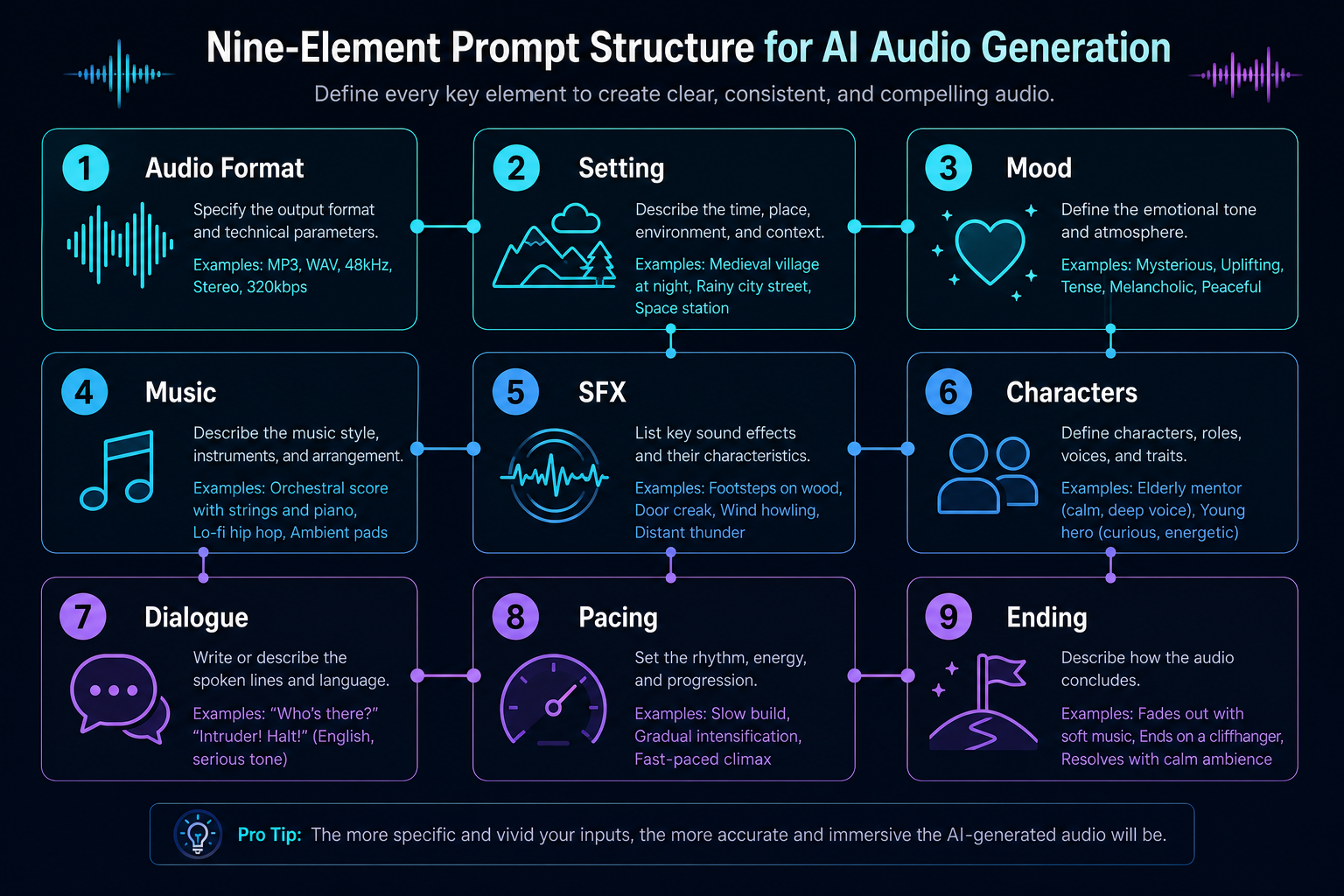
Start by stating exactly what kind of audio you want. Common Seed Audio 1.0 audio formats:
The setting defines the listener's space. Include location, time of day, weather, room tone, background ambience, distance and movement.
Weak prompt
Weak setting prompt — flat, unspecific
Weak Setting Prompt
Generated with Seed Audio 1.0 · ~15s
Prompt used
It is raining somewhere.
Strong prompt
Strong setting prompt — cinematic, immersive
Strong Setting Prompt
Generated with Seed Audio 1.0 · ~15s
Prompt used
A stormy night inside an old coastal lighthouse. Heavy rain hits the windows, distant thunder rolls over the ocean, and the lighthouse lamp rotates with a low mechanical hum.
Mood words shape pacing, instrumentation and vocal delivery. Common mood vocabulary that Seed Audio 1.0 responds well to:
You can also stack moods to create emotional contrast:
The scene begins calm and intimate, then gradually becomes tense and dangerous.
"Add music" is not a music direction. Tell the model what genre, instruments, intensity and dynamics you want.
Background music is subtle and cinematic: deep strings, soft piano notes, low ambient drones, and light percussion. The music stays quiet during dialogue, then rises slightly before the final reveal.
Genre-specific examples:
Weak prompt
Vague music direction — generic, doesn't fit scene
Weak Music Direction
Generated with Seed Audio 1.0 · ~15s
Prompt used
Create a short audio scene. Add music.
Strong prompt
Detailed music direction — cinematic, scene-matched
Strong Music Direction
Generated with Seed Audio 1.0 · ~15s
Prompt used
Create a short cinematic audio scene. Background music is subtle and cinematic: deep strings, soft piano notes, low ambient drones, and light percussion. The music stays quiet during dialogue, then rises slightly before the final reveal.
SFX gives audio physicality. Common SFX types Seed Audio 1.0 handles well:
SFX: paper envelope opening, wind pushing against a wooden door, sudden thunder crack, glass rattling, distant foghorn.
Tip: don't list 20 sound effects. Pick 4–6 that anchor the scene. Seed Audio 1.0 fills in the rest naturally.
For dialogue scenes, describe each character by their function and emotional performance. Avoid asking for impersonation of real people.
Host A: casual, curious, slightly playful.
Host B: amused, thoughtful, quick to respond.
Narrator: clear audiobook narration, calm but tense.
AI Companion: calm, friendly, supportive, natural conversational style.
Exactly imitate this celebrity's voice.
Sound identical to this public figure.
A fictional tech-founder character, calm, witty, and thoughtful. Do not imitate any real voice exactly.
Good dialogue sounds spoken, not written. Keep it short, natural and emotionally specific.
Weak prompt
Stiff dialogue — sounds AI-written
Stiff Dialogue
Generated with Seed Audio 1.0 · ~15s
Prompt used
Create a short tense scene. A character speaks in a stiff, written tone: "I am very afraid because the current situation is dangerous."
Strong prompt
Natural dialogue — sounds spoken
Natural Dialogue
Generated with Seed Audio 1.0 · ~15s
Prompt used
Create a short tense scene. A character speaks urgently and naturally: "Something's wrong. We need to get out of here."
If your scene needs a specific rhythm, tell the model. Common pacing instructions:
Match the timing, emotion, and natural rhythm of on-screen dialogue. Keep each line concise and suitable for lip-sync.
The last 2–3 seconds of generated audio are what listeners remember. Direct them.
Reference audio quality decides how reliable your TA2A and personalized TTS results feel. Treat each clip like a reusable voice asset, not a random recording.
Use @Audio 1 as [Character / narrator / host].
Voice target: [warm, steady, conversational].
Scene effect: [clean studio, light room tone, no music].
Say: "[new line]"
Seed Audio 1.0 supports multiple reference audios in a single prompt — so you can assign different cloned voices to different speakers in one generation. This is what turns a single-narrator output into a full-cast radio drama, podcast or commercial.
Current limit: use up to 3 reference audio clips in one prompt, each 30 seconds or shorter.
When writing your Seed Audio 1.0 prompt, clearly state which character should use which reference audio. The recommended syntax:
Character Name: [role, personality, speaking style], performed by @Audio 1:
"Dialogue line here."
Concrete example:
Host A, performed by @Audio 1, speaks in a calm and curious tone:
"Today we're talking about whether household robots would actually make life better."

Host B, performed by @Audio 2, replies playfully:
"Helpful? Sure. But I don't need a robot judging my midnight snacks."
Once you bind a reference audio to a role, do not switch it mid-prompt unless the story requires a clear character transformation (e.g. possession, disguise, flashback). Switching the same character between @Audio 1 and @Audio 2 will produce inconsistent voice identity.
Reference audio controls the speaker's identity. Audio effects describe how the voice should sound inside the scene. Keep these two layers separate in your prompt:
Captain Hale, performed by @Audio 1, speaks through a damaged radio with light static:
"Rescue team, do you copy?"
Create a [type of audio] for [scene or use case].
Setting: [location, atmosphere, background ambience].
Music: [style, instruments, mood].
SFX: [important sound effects].

Character A, performed by @Audio 1, [emotion or speaking style]:
"[dialogue]"

Character B, performed by @Audio 2, [emotion or speaking style]:
"[dialogue]"

Narrator, performed by @Audio 3, [narration style]:
"[narration]"

End with [final sound, music fade, or transition].
Voice cast: @Audio 1 — Detective Ray · @Audio 2 — Maya · @Audio 3 — Narrator
Three reference voices, one prompt, one generation.
City Alley Radio Drama — 3 Reference Voices
Generated with Seed Audio 1.0 · ~45s
Prompt used
Create a cinematic radio drama scene.
Setting: a rainy night in a city alley. Distant traffic, dripping water, soft thunder, footsteps on wet pavement.
Music: low strings, subtle piano, dark ambient drones. Mood: tense and mysterious.
Detective Ray, performed by @Audio 1, controlled but suspicious:
"You said nobody followed you. Then why is there a second set of footprints?"
Maya, performed by @Audio 2, nervous:
"I don't know. I swear, I came alone."
SFX: distant car braking, rain intensifies, phone vibrates once.
Narrator, performed by @Audio 3, calm and cinematic:
"Ray looked down at the water pooling beneath the streetlight. The footprints stopped exactly where the body had disappeared."
SFX: thunder crack, soft gasp, music rises.
Maya whispers: "Detective... look behind you."
End with a sharp violin hit, heavy rain, and a sudden cut to silence.
Each example below is a full Seed Audio 1.0 prompt you can copy, paste and modify. Listen to the real generated output, then adapt the structure to your own scene.
Example 1 — Radio Drama & Audiobook
Generated with Seed Audio 1.0 · Sample
Prompt used
Create a cinematic radio drama scene for a serialized audiobook.

Setting: a stormy night inside an old coastal lighthouse. Heavy rain hits the windows, distant thunder rolls over the ocean, and the lighthouse lamp rotates with a low mechanical hum. Background music is subtle and cinematic: deep strings, soft piano, low ambient drones, and light percussion. Mood: mysterious, emotional, and suspenseful.

Narrator: clear audiobook narration, calm but tense:
"On the night the lighthouse went dark, Clara found the letter her father had hidden for twenty years."

SFX: paper envelope opening, wind pushing against a wooden door.

Clara: anxious but determined:
"This can't be real. He said the island was abandoned."

Elias: quiet, protective, weary:
"Your father lied to keep you alive. Some stories are buried for a reason."

SFX: sudden thunder crack, glass rattling, distant foghorn.

Clara:
"Then tell me the truth. What's under the lighthouse?"

Elias pauses. Music drops lower.

Elias:
"Not under it. Inside it."

SFX: metal gears turning, hidden stone door opening, deep underground air rushing out.

Narrator:
"And as the stairs appeared beneath the tower, Clara realized the lighthouse had never been guiding ships. It had been guarding something."

Music rises with strings and a soft bass hit. End with distant ocean waves, fading rain, and one final lighthouse bell.

Example 2 — Advertising & Marketing
Generated with Seed Audio 1.0 · ~30s
Prompt used
Create a polished 30-second audio ad for a modern coffee brand.

Setting: early morning in a bright city apartment. A window opens, soft traffic passes outside, and a coffee machine starts brewing. Background music is warm and upbeat: soft guitar, light piano, subtle percussion, and a gentle bass groove. Mood: fresh, optimistic, premium, and inviting.

SFX: coffee beans pouring, grinder starting, espresso machine steaming, ceramic cup placed on a counter.

Narrator: clear, friendly, confident commercial voice:
"Every morning starts with a choice. Rush through the day, or take one perfect moment for yourself."

SFX: coffee pouring into a cup, soft steam.

Narrator:
"Golden Hour Coffee brings rich aroma, smooth flavor, and café-quality freshness straight to your kitchen."

SFX: small spoon stirring, relaxed morning ambience.

Customer:
"That first sip? Exactly what I needed."

Music lifts slightly, brighter and more energetic.

Narrator:
"Crafted for busy mornings, quiet weekends, and every little pause in between."

SFX: phone notification, keys picked up, apartment door opening.

Narrator, warm and memorable:
"Golden Hour Coffee. Make the morning yours."

End with a clean brand sound: soft chime, gentle bass hit, and fading coffee shop ambience.
Example 3 — Podcast Production
Generated with Seed Audio 1.0 · Sample
Prompt used
Create a polished podcast segment about a fun topic: "Would people actually enjoy living with household robots?"

Setting: a cozy modern podcast studio. Add soft room tone, light chair movement, and occasional mug sounds. Background music is very subtle: warm lo-fi beat, soft bass, and light keyboard chords. Mood: relaxed, witty, thoughtful, and friendly.

Intro SFX: short podcast jingle, soft pop sound. Music fades under the conversation.

Host A:
"Today's question is simple: if a robot lived in your house, would it make life better... or just way more awkward?"

Host B:
"Helpful? Definitely. But imagine a robot silently tracking how many times you open the fridge at midnight."

Host A:
"That's the real danger. Not robot rebellion. Robot judgment."

SFX: light laughter, mug placed on desk.

Host B:
"Exactly. Like, 'Based on your recent behavior, you do not need another slice of cake.' That would ruin my whole week."

Host A:
"But if it does laundry, cleans the kitchen, and finds my keys, I might accept the judgment."

Host B:
"I just want boundaries. Don't read my texts, don't comment on my snacks, and never say, 'We need to talk.'"

Host A:
"That's when you unplug it immediately."

SFX: both hosts laugh lightly. Music lifts slightly.

Host B:
"So the perfect household robot is useful, quiet, and emotionally unavailable."

Host A:
"Basically a dishwasher with better timing."

Outro SFX: podcast jingle returns.

Host A:
"Next time, we'll ask an even harder question: should your smart fridge have opinions?"

Music fades out with a clean podcast outro sound.
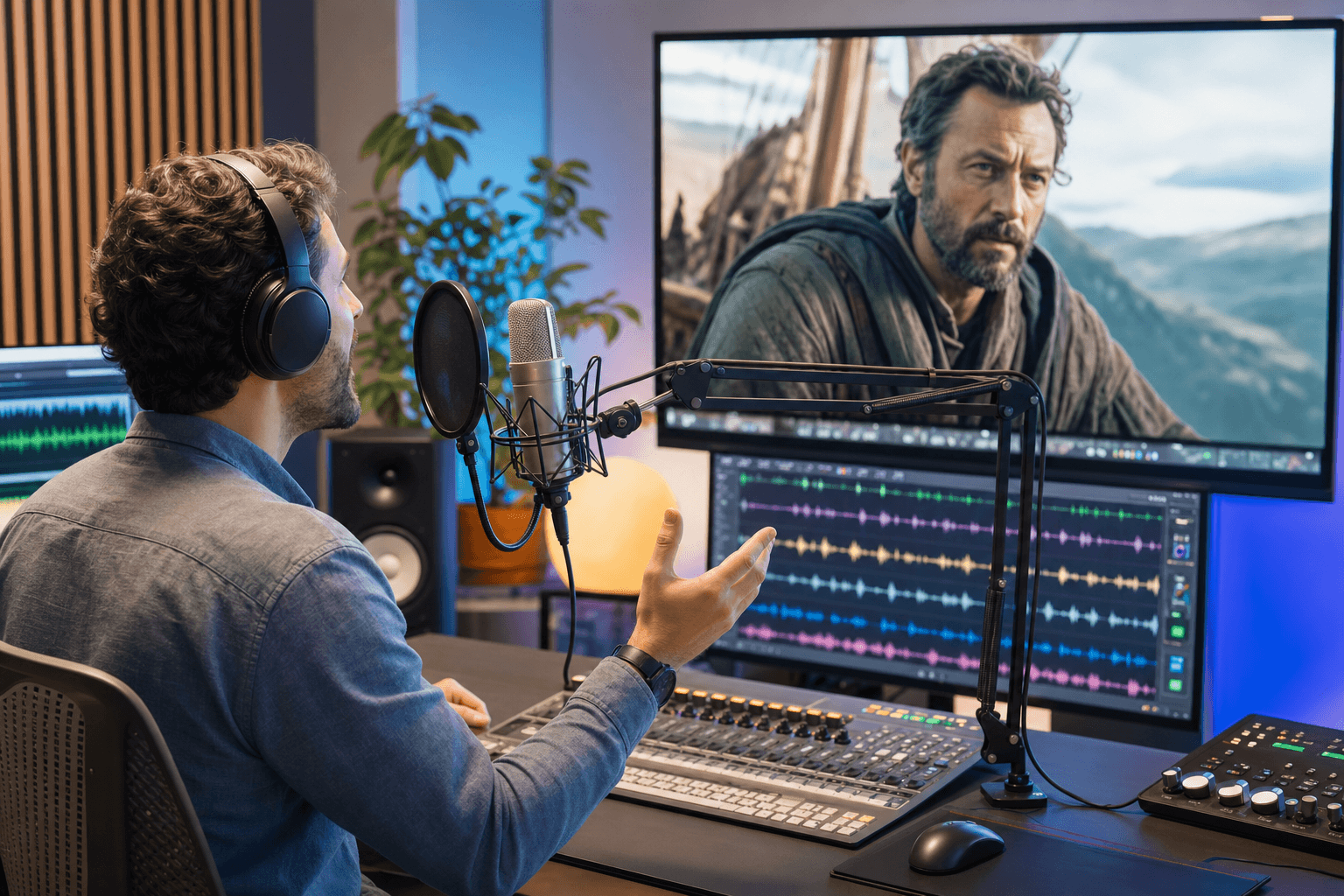
Example 4 — Video Dubbing
Generated with Seed Audio 1.0 · Sample
Prompt used
Create a cinematic video dubbing audio track for a short sci-fi scene.

Scene: inside a futuristic rescue vehicle moving through a rainy city at night. Neon lights reflect on wet streets. The vehicle engine hums softly, rain hits the windshield, and distant sirens pass in the background. Music is subtle and tense: low synth pads, light percussion, and soft pulsing bass. Mood: urgent, emotional, and hopeful.

Dubbing requirement: match the timing, emotion, and natural rhythm of on-screen dialogue. Keep each line concise and suitable for lip-sync.

Character A: focused and worried:
"We're running out of time. The signal is getting weaker."

SFX: radar beep, soft screen tap, rain intensifies.

Character B: calm but determined:
"Stay with it. If there's still a signal, there's still someone alive."

Character A:
"I found the location. Three blocks east, underground level."

SFX: vehicle accelerates, tires splash through water.

Character B:
"Then we go now. No one gets left behind."

Music rises slightly with a hopeful tone.

Radio voice: filtered communication audio:
"Rescue team, proceed with caution. Power grid is unstable."

SFX: brief radio static, warning beep, distant electrical crackle.

Character A, quieter:
"You really think we can make it?"

Character B:
"We don't have to be sure. We just have to try."

End with the vehicle braking, door opening, heavy rain outside, and music fading into a suspenseful pause.

Example 5 — Personal AI Voice Companion
Generated with Seed Audio 1.0 · Sample
Prompt used
Create a warm personal AI voice companion scene.

Setting: a quiet evening at home. Soft rain taps against the window, a desk lamp is on, and a phone rests beside a notebook. Background music is very subtle: gentle piano, soft ambient pads, and a slow calming rhythm. Mood: comforting, personal, thoughtful, and slightly hopeful.

SFX: soft phone notification, light rain, quiet room tone.

AI Companion: calm, friendly, supportive, natural conversational style:
"Hey, you made it through a long day. Before we move on, take one slow breath with me."

SFX: gentle inhale-exhale cue, music softens.

User: tired but trying to stay positive:
"I still feel like I didn't get enough done."

AI Companion:
"You handled more than you're giving yourself credit for. You answered the important messages, finished the proposal draft, and took that walk you kept putting off."

SFX: soft interface chime.

AI Companion:
"Tomorrow looks lighter. You have one meeting at ten, and I blocked twenty minutes before it so you can review your notes."

User:
"That actually helps. Can you remind me to sleep earlier tonight?"

AI Companion:
"Already set. I'll give you a gentle reminder at ten-thirty. No pressure, just a nudge."

SFX: soft confirmation beep.

User, relieved:
"Thanks. I needed that."

AI Companion:
"I'm here. Let's keep tonight simple: water, a short stretch, and then rest."

Music warms slightly.

AI Companion:
"You don't have to solve everything tonight. Just take the next small step."

End with soft rain, a gentle notification chime, and fading calm music.

Example 6 — Immersive Game & XR Soundscape
Generated with Seed Audio 1.0 · Sample
Prompt used
Create an immersive game soundscape for a fantasy exploration scene.

Setting: the player enters an ancient forest ruin at dusk. Tall trees surround broken stone arches, glowing plants pulse softly, and a hidden temple lies ahead. The sound should feel spacious, layered, and interactive.

Background ambience: gentle wind through leaves, distant birds, faint insects, soft tree creaks, and low magical hums coming from the ruins. Add subtle spatial movement, as if sounds are shifting around the player.

Music: minimal cinematic fantasy score with soft strings, low drones, hand drums, and distant choir textures. Mood: mysterious, beautiful, slightly dangerous, and full of discovery.

SFX: footsteps on moss and broken stone, small branches snapping, leaves brushing against armor, distant water dripping inside the ruins.

Player companion: calm but cautious:
"Stay close. This place feels older than the maps."

SFX: glowing plant pulse, soft magical shimmer.

Ancient mechanism activates nearby: stone gears turn slowly, dust falls, and a hidden door begins to open.

Player companion, whispering:
"That sound... something just woke up."

Music becomes darker, with deeper drums and rising tension.

SFX: low creature growl far away, birds suddenly scatter, wind intensifies through the trees.

A magical waypoint appears ahead with a bright chime and soft energy swirl.

System voice: clean, subtle game UI tone:
"New objective discovered."

End with layered forest ambience, distant temple rumble, fading magical hum, and a soft suspenseful music tail.
Weak: Make a cool audio.
Better: Create a tense sci-fi radio drama scene inside a damaged spacecraft. Add low synth drones, warning alarms, radio static, and two characters speaking urgently as they try to restore power before oxygen runs out.
Weak: Add beeps, then beeps, then more beeps, then another beep.
Better: Add a short sequence of UI beeps, screen taps, and data-loading sounds.
Weak: Make the voice sound exactly like [real person].
Better: Use a fictional public-speaker style: confident, energetic, and theatrical. Do not imitate any real voice exactly.
Weak: @Audio 1 says something, then @Audio 2 talks, then the narrator speaks.
Better: Host A, performed by @Audio 1: "…" Host B, performed by @Audio 2: "…" Narrator, performed by @Audio 3: "…"
Weak: Host A, performed by @Audio 1, cheerful, bright, friendly, warm, casual, energetic, natural, realistic, speaks…
Better: Host A, performed by @Audio 1, cheerful and natural.
Strong prompts also respect the model's operating limits. Keep scenes compact, use clean references, and build long-form projects from short sections instead of forcing everything into one generation.
Prompt limit
Use up to 2,048 characters per prompt. For detailed scenes, 1,500-2,000 characters is usually enough direction.
Reference audio
Use up to 3 reference audio clips. Keep each clip 30 seconds or shorter, clean, single-speaker and consistent.
Output length
Generate up to about 2 minutes per pass. For longer projects, create short sections and continue, stitch or batch them.
Languages
Seed Audio 1.0 currently supports English and Chinese audio generation. State the target language in the prompt.
The best Seed Audio 1.0 prompt follows a 9-element structure: audio type, setting, mood, music, sound effects, characters, dialogue, pacing and ending. Filling in each layer gives the model a complete creative brief instead of a single sentence.
The current prompt limit is 2,048 characters. For a short demo, 800-1,500 characters is usually enough. For a detailed scene, 1,500-2,000 characters works well, leaving a small buffer under the limit.
Use the 9-element structure plus character role descriptions. Define each character by function and emotion (not by celebrity name), write natural spoken dialogue, layer in SFX at key moments, and direct the music to rise and fall around the dialogue. See Example 1 above for a complete radio drama prompt template.
Yes. Seed Audio 1.0 supports multiple reference audios in one prompt. Use the syntax: `Character Name, performed by @Audio 1, [emotion]: "dialogue line"`. Keep each character's reference audio consistent throughout the prompt, and do not switch the same role between different @Audio IDs unless the story requires a clear transformation.
You can use up to 3 reference audio clips in one generation, and each clip should be 30 seconds or shorter. Bind each clip to a named role such as @Audio 1 for Host A, @Audio 2 for Guest, and @Audio 3 for Narrator.
T2A means text-to-audio: you describe the whole scene in text and let the model choose voices, music and SFX. TA2A means text-and-audio-to-audio: you add reference clips, then use @Audio 1, @Audio 2 or @Audio 3 to control specific voice identities. Some APIs display the same idea with compact tags such as @Audio1.
A weak prompt is a sentence ("Make an audio story"). A strong Seed Audio 1.0 prompt is a brief: it tells the model the format, the setting, the mood, the music direction, the SFX, the characters, the dialogue and the ending. The same model produces dramatically better output the more layered your prompt is.
Yes. Emotion words shape the model's vocal performance. Use specific words like "tense," "hopeful," "suspenseful," "playful," "intimate" or "epic." You can also stack contrasting moods, for example, "begins calm and intimate, then gradually becomes tense and dangerous," to direct emotional arcs.
Stiff output usually means stiff dialogue. Rewrite lines the way people actually speak: use contractions, short sentences and emotional beats. Replace "I am very afraid because the current situation is dangerous" with "Something's wrong. We need to get out of here." Also check that you've added a clear emotion direction to each character.
The five most common mistakes are: overly generic prompts, repeating the same SFX endlessly, asking for exact imitation of real people, unclear reference audio assignments, and overloading lines with stacked adjectives. See the Common Mistakes section above for specific weak-vs-better examples.
Yes. Every prompt example on this page is free to copy, modify and use commercially under any paid Seed Audio 1.0 plan. The generated audio belongs to you with full commercial rights from your first paid generation forward.
You've got the structure, the formula, the templates and the examples. Open Seed Audio 1.0 and put one of these prompts to work.